How to Run ChatGPT Ads for Lead Generation Guide
To run ChatGPT ads for lead generation, create an Ads Manager account, add the lead tracking pixel, write context hints around your buyers’ questions, send clicks to a focused landing page, and optimise for qualified leads, starting with a small test budget.
ChatGPT ads are new, and the rules are still changing. This guide is current as of October 2026 and shows you a practical, test-first process for lead generation businesses in India.
If you prefer an expert to run the campaign, see our ChatGPT Ads Management Service.
What Are ChatGPT Ads?
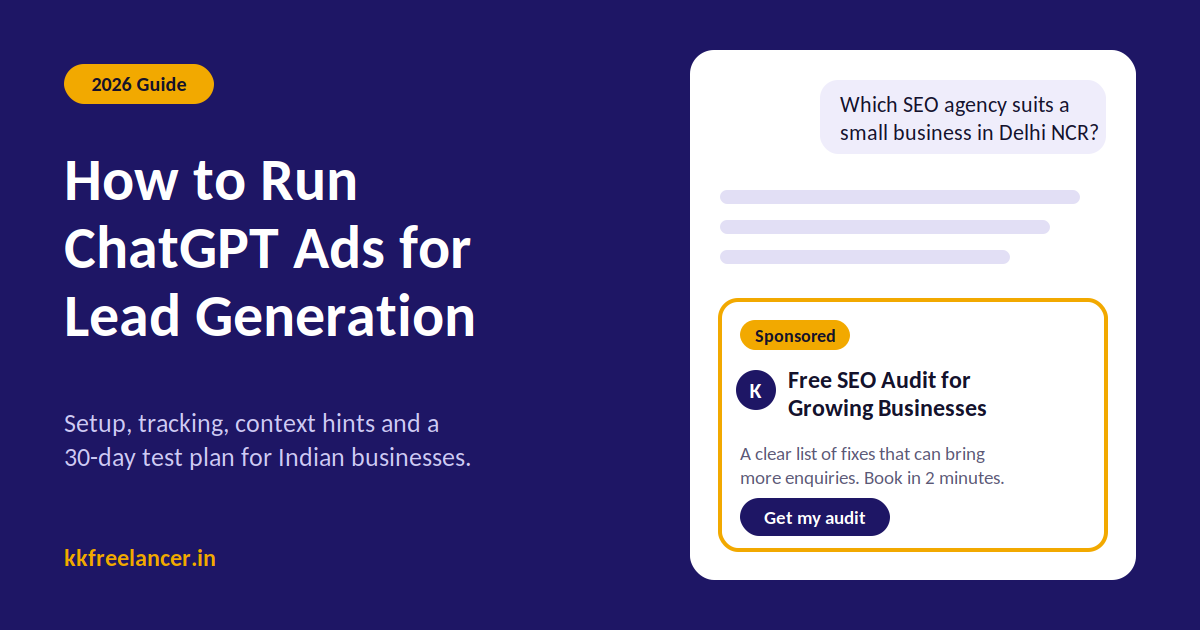
ChatGPT ads are paid placements shown inside ChatGPT. A clearly labelled sponsored unit appears below an answer when the conversation is relevant to your offer.
Each ad typically includes your business name, logo, headline, short description, image and a landing page link.
Key Facts to Know Before You Spend
- Who sees them: Users on the Free and Go plans. Plus, Pro, Business and Enterprise accounts do not see ads, and neither do Temporary Chats or accounts identified as under 18.
- Where they appear: Below the answer, separate from ChatGPT’s response.
- What they cannot do: Ads do not change what ChatGPT says. OpenAI states that advertisers cannot influence answers.
- Privacy: Advertisers do not see individual chats. You receive aggregated results such as impressions and clicks.
- Sensitive topics: Ads are not shown near some categories, such as mental health and politics, and certain regulated industries may need extra checks.
Are ChatGPT Ads Available in India?
Yes. Ads began showing to Free and Go users in India on 27 August 2026. Self-serve Ads Manager access opened for Indian advertisers on 31 August 2026, and India is listed as available on OpenAI’s Ads Manager availability page.
Campaigns can start from a minimum daily budget of ₹725. Always confirm the current minimum inside Ads Manager, because limits can change.
Is ChatGPT Advertising Right for Your Lead Gen Business?
ChatGPT users often ask long, detailed questions before they choose a provider. That suits businesses where buyers research first.
Good Fit
- B2B services, software and agencies
- Education and training institutes
- Real estate, legal and finance-adjacent services (check policy rules first)
- Healthcare services (check restrictions carefully)
- High-consideration products and services
Weak Fit
- Very low-ticket impulse offers
- Businesses without tracking or a working landing page
- Regulated categories you have not checked against OpenAI’s ad policies
Treat ChatGPT ads as a test channel beside your proven ones. Our Google Ads Service captures people already searching, while ChatGPT ads reach people during research.
How ChatGPT Ads Differ from Google Ads
| Factor | ChatGPT Ads | Google Search Ads |
|---|---|---|
| Targeting signal | Conversation context | Search keywords |
| Keyword control | Context hints (loose guidance) | Match types |
| Ad position | Below the AI answer | Search results page |
| Maturity | Launched in 2026 | Established for years |
| Best for | Research-stage buyers | Ready-to-buy searches |
The biggest change is control. You cannot lock your ad to an exact phrase. You describe your offer and audience, and the system decides which conversations fit.
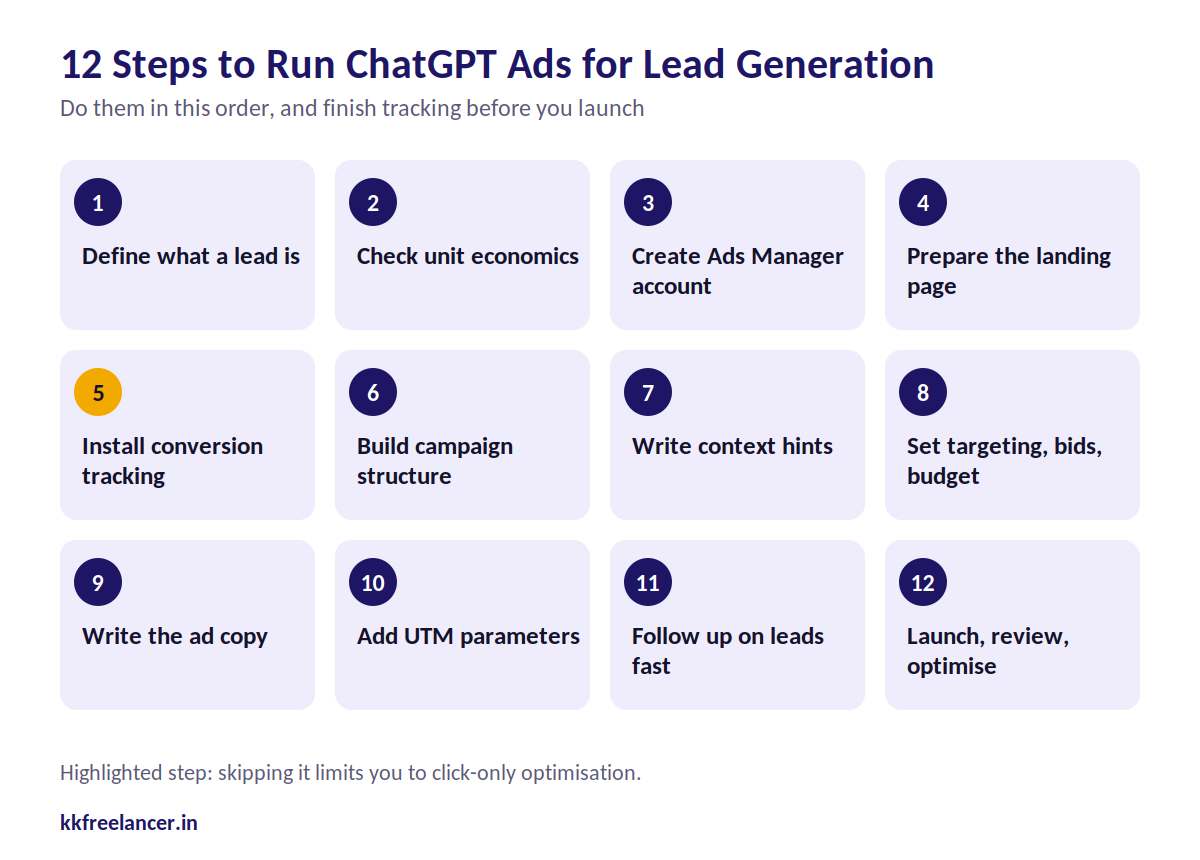
Step-by-Step: How to Run ChatGPT Ads for Lead Generation
Step 1: Define What a Lead Is
Write down what counts as a qualified lead before you open Ads Manager. A phone number from a random visitor and a booked demo from a decision maker are very different results.
Decide on:
- The single offer you will test (free audit, demo, quote, consultation)
- The ideal customer profile
- The action you will count as a lead
Our post on the sales pipeline explains how to define stages, and the B2B sales ecosystem guide helps if you sell to businesses.
Step 2: Check Your Unit Economics First
Know the most you can pay for a qualified lead before spending anything.
Formula: Allowable cost per qualified lead = (Gross profit per customer × lead-to-customer rate) × share of profit you will spend on acquisition
Illustrative example (not a benchmark):
| Input | Value |
|---|---|
| Average customer value | ₹60,000 |
| Gross margin | 40% |
| Gross profit per customer | ₹24,000 |
| Qualified lead to customer rate | 10% |
| Gross profit per qualified lead | ₹2,400 |
| Share you will spend on ads | 50% |
| Allowable cost per qualified lead | ₹1,200 |
Use our CPA and CAC Calculator and CLV Calculator to run your own numbers. Our guide to business unit economics explains the logic in depth.
Step 3: Create Your Ads Manager Account
- Go to OpenAI’s Ads Manager and sign in with your OpenAI account.
- Enter your legal business name, website, industry and logo.
- Confirm country, currency and time zone.
- Complete verification and add billing details.
Verification and billing are separate steps. Finish both before planning a launch date.
Step 4: Prepare a Landing Page That Converts
The system reads your landing page to judge relevance, and visitors often arrive after a detailed conversation. A vague homepage hurts both relevance and conversions.
Your landing page should have:
- A headline that matches the ad promise
- One offer and one form
- Short form fields (name, work email or phone, one qualifying question)
- Proof such as client logos, results and testimonials
- Fast mobile loading
If your page needs work, our Website Designing Service builds conversion-focused pages, and our Content Marketing Service writes the copy.
Also make sure OpenAI’s crawlers can read the page. A blocked crawler can stop an ad from running. Use our Robots.txt Generator and read our robots.txt guide to check your rules.
Step 5: Install Conversion Tracking Before You Launch
This is the step most beginners skip. Without conversion events, you can only optimise for clicks.
What to set up:
- Measurement Pixel: Create a data source in Ads Manager to get a Pixel ID, then install the script on your site.
- Lead event: Fire the
lead_createdevent on your thank-you page or after a successful form submission. Do not fire it on the form page itself. - Conversions API (optional but useful): Send server-side events, such as CRM stage changes, and reuse the same event ID to avoid double counting.
- Click reference: Keep OpenAI’s click identifier (
oppref) intact through redirects. - Test it: Submit your own form and confirm the event appears in the Ads Manager event stream.
You can only choose one standard conversion event as your optimisation goal, and custom events cannot be used for that.
For a Tag Manager setup, see our GTM Certification Course and Conversion Tracking Certification Course. Our Google Analytics guide helps you read results alongside platform data.
[Insert Performance Screenshot Blueprint Here: Ads Manager Event Stream Showing lead_created Event]
Step 6: Build Your Campaign Structure
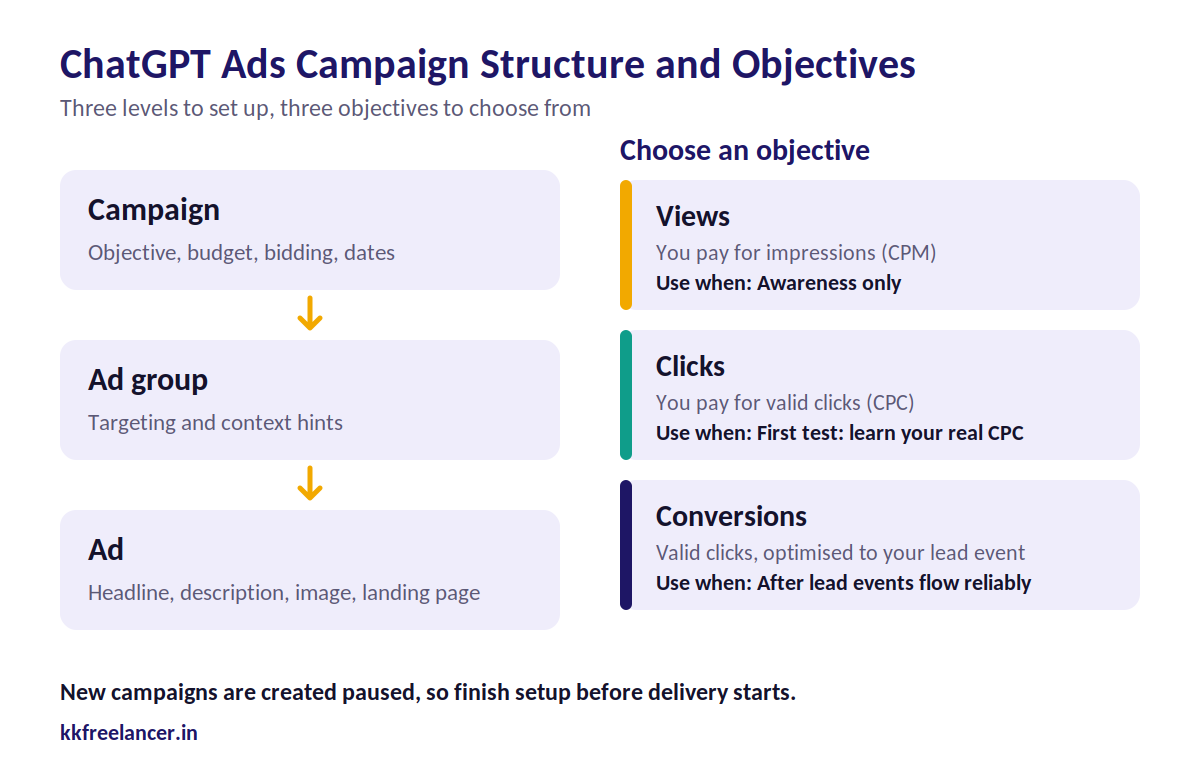
Ads Manager follows a familiar hierarchy: campaign, ad group and ad.
| Level | What You Set |
|---|---|
| Campaign | Objective, budget, bidding, dates |
| Ad group | Targeting, context hints |
| Ad | Headline, description, image, landing page |
Choosing an objective:
| Objective | You Pay For | Use When |
|---|---|---|
| Views | Impressions (CPM) | Awareness only |
| Clicks | Valid clicks (CPC) | First test, learning your real CPC |
| Conversions | Valid clicks, optimised toward your lead event | After you have conversion data |
Start with the Clicks objective. It shows your real cost per click and click quality. Move to Conversions once the pixel is firing reliably and you have enough lead events.
New campaigns are created paused, so you can finish setup before delivery starts.
Step 7: Write Context Hints for Lead Generation
Context hints describe the conversations where your offer is relevant. They are not exact-match keywords, and OpenAI does not guarantee delivery in a specific conversation.
Write them as the questions your buyers actually ask:
| Weak Hint | Better Hint |
|---|---|
| digital marketing | People comparing SEO agencies for a small business in Delhi NCR |
| software | Founders looking for a CRM to manage B2B sales leads |
| courses | Students asking which certification helps them start a career in digital marketing |
Create separate ad groups for separate needs. One ad group for “comparing providers” and another for “how to solve problem X” lets you see which intent brings better leads.
Step 8: Set Targeting, Bids and Budget
- Location: Target India or your service cities.
- Platform: Choose ChatGPT web, iOS, Android or all.
- Budget: Start from the platform minimum and set a fixed test period.
- Bid: Use the bid-strength guidance in Ads Manager. Check for “bid too low” warnings before judging performance.
OpenAI’s public guidance for suggested starting bids is given in US dollars, so rely on the in-platform guidance for India rather than converting a number blindly.
Plan your test spend with our Ads Budget Calculator and Media Buying Plan Creator. The CPC Calculator helps you estimate clicks and cost.
Step 9: Write the Ad Copy
Keep the ad clear, specific and consistent with the landing page.
Ad copy checklist:
- Headline names the outcome, not just the service
- Description states who it is for and the next step
- Logo and image look professional
- Offer matches the page exactly
Example for a lead gen offer:
- Headline: Free SEO Audit for Growing Businesses
- Description: Get a clear list of fixes that can bring more enquiries. Book your audit in 2 minutes.
Our Ad Copy AI Workflow Pack gives you prompts to draft and test variations faster.
Step 10: Add UTM Parameters
Tag every ad link so ChatGPT traffic is easy to find in your analytics and CRM. Use our UTM Builder to create consistent links.
A simple naming pattern:
- Source:
chatgpt - Medium:
paid-ai - Campaign: your offer name
- Content: ad variation
Step 11: Capture and Follow Up on Leads Fast
A lead that waits a day for a reply is a wasted click. Respond quickly, especially to demo requests.
- Send form leads to your CRM with the source tagged
- Trigger an instant email or WhatsApp confirmation
- Call high-intent leads within a defined time window
If your buyers prefer WhatsApp, the Lead Capture Bot for WhatsApp can help collect and qualify enquiries automatically.
Step 12: Launch, Review and Optimise
Launch with a fixed budget and a fixed test window. Review early metrics carefully, because spend reporting can lag behind clicks by several hours.
| Metric | What It Tells You | Action |
|---|---|---|
| CTR | Ad relevance | Rewrite headline and hints if low |
| Average CPC | Auction competitiveness | Adjust bid within guidance |
| Landing page conversion rate | Page and offer strength | Improve the page before raising budget |
| Cost per lead | Efficiency | Compare to your allowable limit |
| Cost per qualified lead | Real quality | The number that decides scale or stop |
| Lead-to-customer rate | Business value | Feed back into unit economics |
Use our CTR Calculator, Conversion Rate Calculator and ROI Calculator to check each stage. Our post on how to calculate conversion rate explains the formula.
[Insert Real Client Campaign ROI Metric Here: Spend, Leads, Cost per Qualified Lead and Closed Revenue from a ChatGPT Ads Test]
A 30-Day ChatGPT Ads Test Plan
| Week | Focus | Output |
|---|---|---|
| 1 | Offer, unit economics, account, tracking | Verified account, working pixel, landing page |
| 2 | Launch Clicks campaign with 2 ad groups | First CPC and CTR data |
| 3 | Improve hints, copy and landing page | Better click quality |
| 4 | Switch to Conversions if data allows | Cost per qualified lead, scale or stop decision |
Decide your stop rule before you start. For example, pause an ad group if it spends a set multiple of your allowable cost per lead without a qualified lead.
Common Mistakes to Avoid
- Launching without conversion tracking
- Treating context hints like exact-match keywords
- Sending traffic to a generic homepage
- Starting with the Conversions objective before events are flowing
- Judging results within the first day
- Counting any form fill as a good lead
- Expecting ads to change what ChatGPT recommends
ChatGPT Ads vs Ranking in ChatGPT Answers
Paying for an ad does not make ChatGPT recommend you in its answer. Those are separate systems.
To be mentioned in the answers themselves, you need generative engine optimisation. Read our guide on how to rank your website on ChatGPT and how to rank in AI Overview, or explore our GEO Service and SEO Service.
The strongest approach combines both: ads for fast, controlled visibility, and organic visibility for long-term trust.
Should You Run ChatGPT Ads Yourself or Hire an Expert?
| Situation | Better Option |
|---|---|
| Small test budget, someone can handle tracking | Self-serve |
| No tracking skills or developer access | Expert or agency |
| Multiple offers, markets or product feeds | Expert or agency |
| Want to learn the channel in depth | Self-serve plus training |
If you want to learn the process yourself, see our ChatGPT Ads Certification Course. If you want it handled, our ChatGPT Ads Management Service covers readiness checks, setup, tracking, optimisation and reporting. You can also review our case studies and, for social lead campaigns, our Social Media Ads Service.
Frequently Asked Questions
Can I run ChatGPT ads for lead generation in India?
Yes. Ads Manager is available to Indian advertisers. Complete business verification and billing first, then set up conversion tracking before launching.
What is the minimum budget for ChatGPT ads in India?
Campaigns can start from ₹725 per day. Confirm the current figure in Ads Manager before you plan a test.
How do I track leads from ChatGPT ads?
Install the OpenAI Measurement Pixel and fire the lead event after a successful form submission. Add UTM parameters and, where possible, send server-side events through the Conversions API.
Which objective is best for lead generation?
Start with Clicks to learn your real cost per click. Move to Conversions when your lead event has enough data to optimise against.
Can I target keywords on ChatGPT?
Not in the Google Ads sense. You write context hints that describe relevant conversations, and the system decides where your ad fits.
Do ChatGPT ads change what ChatGPT recommends?
No. OpenAI states that ads run separately from answers and cannot alter them.
Are ChatGPT ads better than Google Ads?
They are a different channel. Google Ads captures ready-to-buy searches, while ChatGPT ads reach people who are researching. Most businesses should test ChatGPT ads beside proven channels.
How long should I test before deciding?
Plan a few weeks with a fixed budget and a clear stop rule. A single day of data is not enough.
Final Takeaway
ChatGPT ads can bring useful leads if you prepare the basics: a clear offer, a landing page that converts, proper tracking and a defined cost limit. Start small, measure qualified leads, and scale only what the numbers support.
Want a ChatGPT ads test set up properly? Book a free consultation with Kkfreelancer and we will tell you honestly whether it fits your business right now.